How Telemetry Flows Through the OpenTelemetry Collector: Traces, Metrics and Logs for Beginners
A textbook-style tour, with diagrams, of how one sample service's data travels from app to backend
When you first meet OpenTelemetry, the hardest part is not any single command. It is the picture: where does the data start, what carries it, what happens to it in the middle, and where does it end up? This beginner's explainer from CloudSkill Consulting LLC answers that question for all three kinds of telemetry at once. We follow one small sample service, checkout-demo, from the moment it produces data to the moment you can read that data yourself.
We go in lessons. Each lesson explains one idea in text, and a small diagram beside it shows the same idea.
Lesson 1. Three signals, three questions
Telemetry is the data your systems send out about themselves. OpenTelemetry calls each kind a signal, and there are three main ones:
Traces record the path of one request through your services. Each step in that path is a span.
Metrics are numbers measured over time, such as requests per second.
Logs are event messages, such as an error message.
Each signal answers a different question. A metric tells you that something is wrong. A trace tells you where. A log tells you what happened. In this guide, all three get the same care, because they all take the same trip.
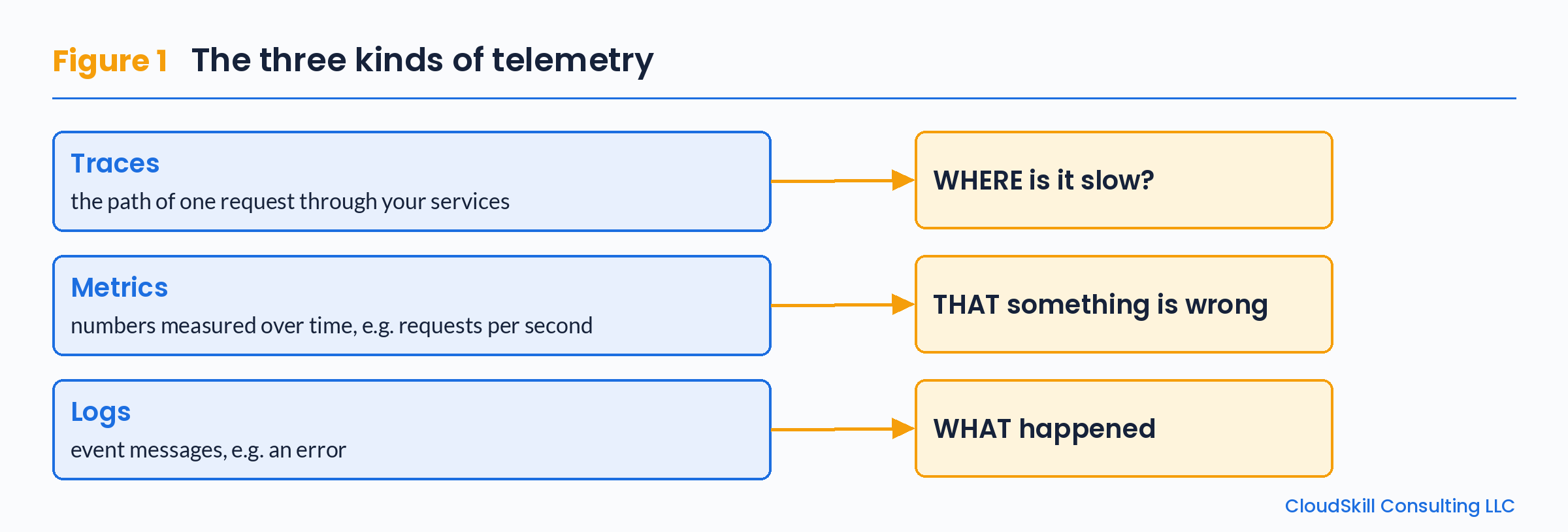
Figure 1. The three signals, and the question each one helps you answer.
Lesson 2. The four stops on the journey
Every piece of telemetry makes the same trip, whatever its signal.
Create. Inside your app, an OpenTelemetry SDK or instrumentation library creates spans, metrics and logs. Each one carries a resource: a set of attributes that describe who produced it. The most important resource attribute is
service.name. For our sample service it ischeckout-demo, and it is how you will later find this service's data among everything else.Carry. The data is sent over the network using OTLP (the OpenTelemetry Protocol), OpenTelemetry's own way of sending telemetry from one place to another. An OTLP receiver usually listens on port 4317 for gRPC and port 4318 for HTTP.
Process. The OpenTelemetry Collector receives the data, can change it on the way through, and sends it on.
Store. A backend stores the data and lets you search and chart it.
The Collector is optional in theory, but in practice it is the central stop: it lets you change where data goes without changing every app.
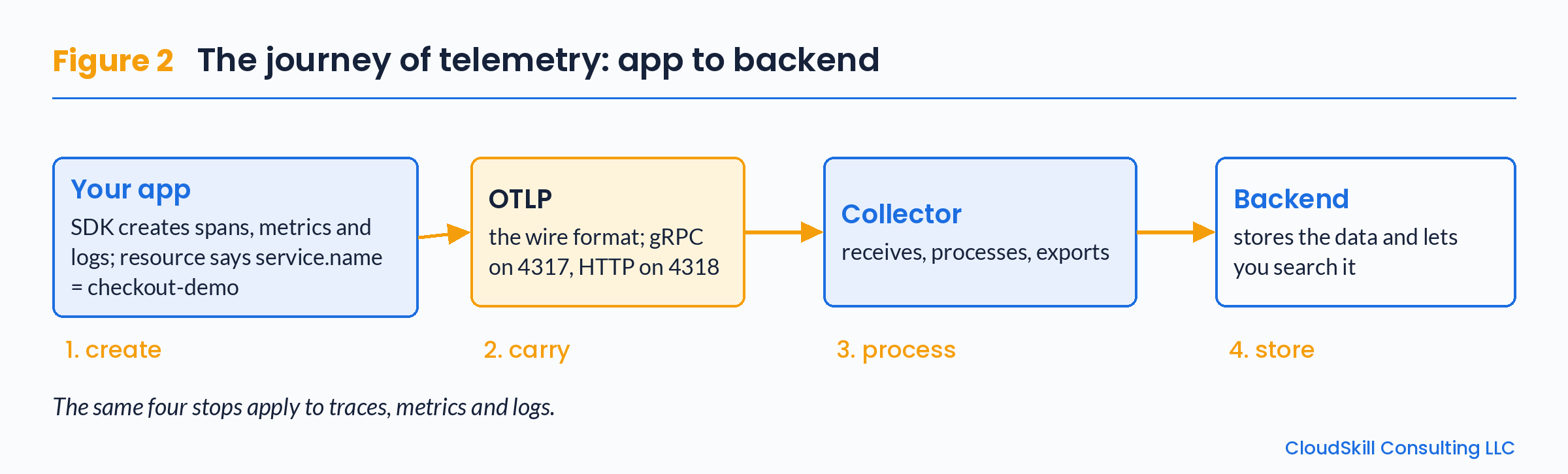
Figure 2. Create, carry, process, store: the same four stops for traces, metrics and logs.
Lesson 3. Inside the Collector: one receiver, three pipelines
Think of the Collector as a small post office for checkout-demo's data. Its config file tells it four things (configuration docs):
Receivers: the front door. This is where
checkout-demo's data comes in. Our front door is theotlpreceiver, because the data arrives as OTLP.Processors: the sorting table. Here the data can be changed before it leaves. We use
batch, which packs many small items together so they travel in groups.Exporters: the way out. This is where the data goes next. In real life that is a backend. For learning, we use
debug, which simply prints the data on the Collector's screen.The
servicesection: the route plan. It links a door, a table and a way out into a pipeline. Each pipeline is for one signal only:traces,metricsorlogs.
One receiver can feed several pipelines. That is the key idea of this lesson: the same otlp receiver takes in all three signals, and the Collector then sends each signal down its own pipeline. Processors in a pipeline run in the order you list them. Defining a part at the top of the file is not enough: you also need to put it in a pipeline.
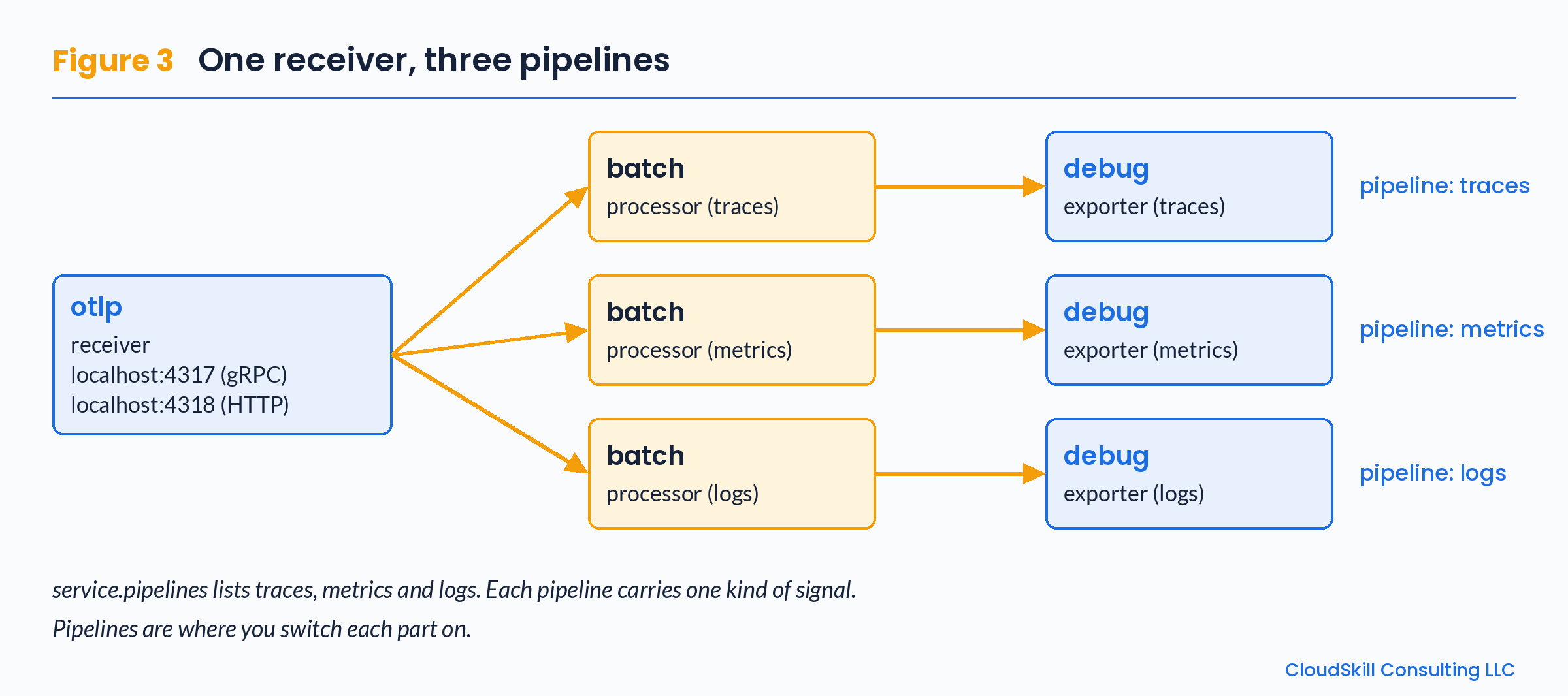
Figure 3. One receiver, three pipelines. Each signal travels its own line through the Collector.
Here is a minimal learning config that matches Figure 3:
receivers:
  otlp:
    protocols:
      grpc:
        endpoint: localhost:4317  # gRPC, only this computer can send
      http:
        endpoint: localhost:4318  # HTTP, only this computer can send

processors:
  batch: {}

exporters:
  debug:
    verbosity: detailed

service:
  pipelines:
    traces:
      receivers: [otlp]
      processors: [batch]
      exporters: [debug]
    metrics:
      receivers: [otlp]
      processors: [batch]
      exporters: [debug]
    logs:
      receivers: [otlp]
      processors: [batch]
      exporters: [debug]
The otlp receiver now has two doors: gRPC on port 4317 and HTTP on port 4318. Our test tool below uses the gRPC door.
Read it from the bottom up. The service.pipelines block names three lines. Each line says: take data from otlp, pass it through batch, and print it with debug. The blocks above it simply define those parts.
Lesson 4. Walk-through: watch checkout-demo's data arrive
Now we watch the flow happen. We do not need a real app: telemetrygen, a tool from the OpenTelemetry project, can play the part of checkout-demo and send all three signals. If you have Go on your computer, one command installs it:
go install github.com/open-telemetry/opentelemetry-collector-contrib/cmd/telemetrygen@latest
Start the Collector with the config from Lesson 3. Then, in a second terminal, send one item of each signal, naming the sample service with the --service flag:
# 1) one trace
telemetrygen traces  --otlp-insecure --traces 1  --service checkout-demo
# 2) one metric
telemetrygen metrics --otlp-insecure --metrics 1 --service checkout-demo
# 3) one log
telemetrygen logs    --otlp-insecure --logs 1    --service checkout-demo
Now switch to the Collector's terminal. Your job is simple: find service.name: checkout-demo three times. Look for it once in the trace output, once in the metric output and once in the log output. It sits with the resource attributes. If you find all three, then all three signals reached the Collector and came out of their own pipelines.
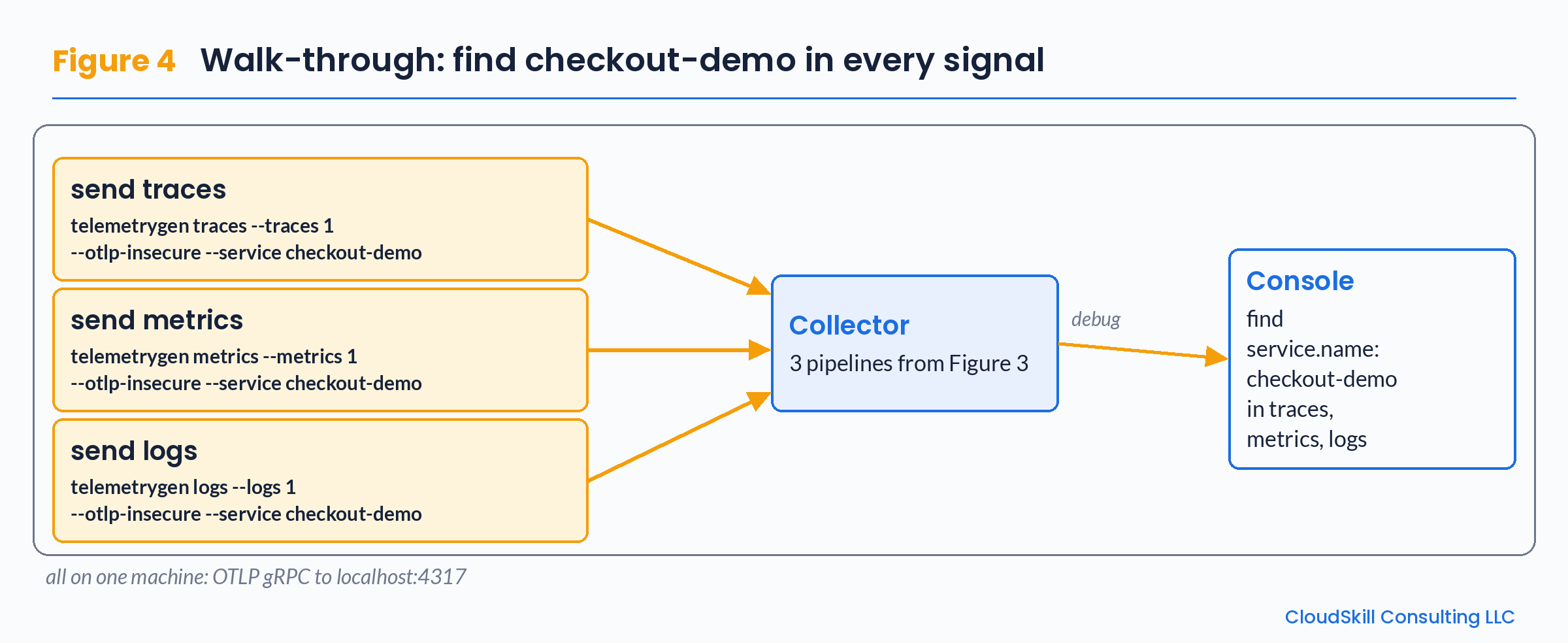
Figure 4. The walk-through: find checkout-demo once in each signal's output.
Lesson 5. Who is allowed to send data in?
The receiver's endpoint decides who can send data to it. With localhost, only your own computer can send data. With 0.0.0.0, the Collector listens on every network interface. Then any computer that can reach yours can send data too. The OpenTelemetry security best practices advise binding to a specific interface, such as localhost or a pod's IP, instead of 0.0.0.0. Since Collector v0.110.0, if you don't set an endpoint, the Collector uses localhost. In Docker or Kubernetes, localhost may not behave as you expect, so deployed configs often use a different, specific address.
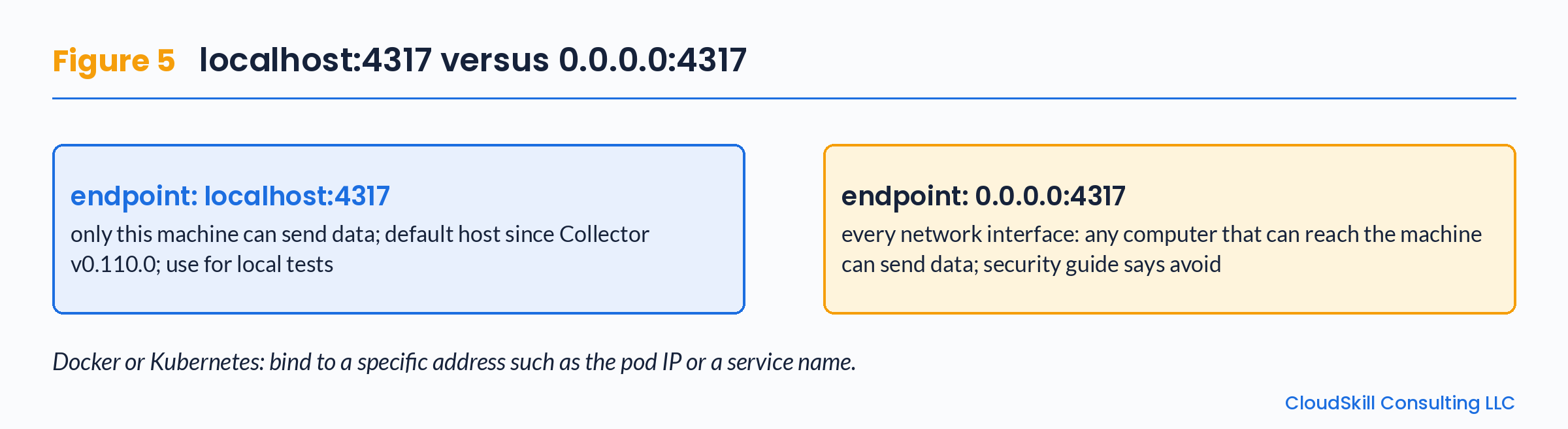
Figure 5. The endpoint address decides who can send data in. Pick the narrowest address that works.
Where to go next
In a real setup you replace the debug exporter with an exporter for your backend, and you may add processors to shape the data. Because one Collector config carries all three signals, a small mistake can affect everything you collect, so changes deserve testing before they reach production. A CloudSkill Consulting LLC guide on testing Collector config changes safely is coming soon on our Dev.to.
Key terms
Signal: one kind of telemetry: traces, metrics or logs.
Span: one step in a trace.
Resource /
service.name: attributes describing who produced the data;service.namenames the service.OTLP: the OpenTelemetry Protocol that carries telemetry (4317 gRPC, 4318 HTTP).
Pipeline: one line in
service.pipelinesthat carries one signal from receivers through processors to exporters.
Written by the CloudSkill Consulting LLC team, a multi-cloud architecture, FinOps and observability consultancy (cloudskillconsulting.com). Questions: info@cloudskillconsulting.com